
Mit unserem ActiveCampaign-Add-on können Sie Ihre Partner ganz einfach zu einer ActiveCampaign-Liste hinzufügen und ihrem Konto einen Tag zuweisen.
Gehen Sie auf Ihrer Website zu > Dashboard > Easy Affiliate > Registerkarte „Add-ons“. Installieren und aktivieren Sie dort zunächst das ActiveCampaign-Add-on.
Nach der Aktivierung gehen Sie zu Dashboard > Einstellungen > Integrationen > Aktive Kampagne und konfigurieren Sie wie in der Abbildung unten gezeigt:
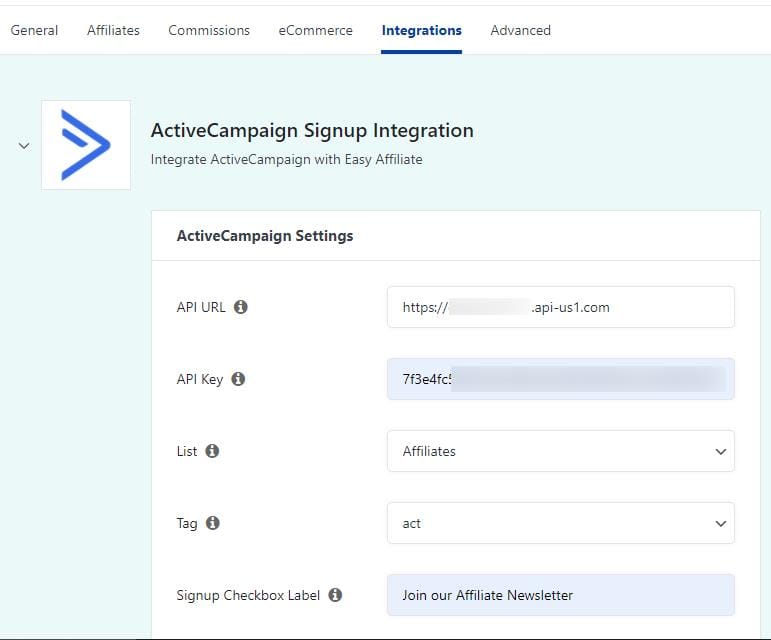
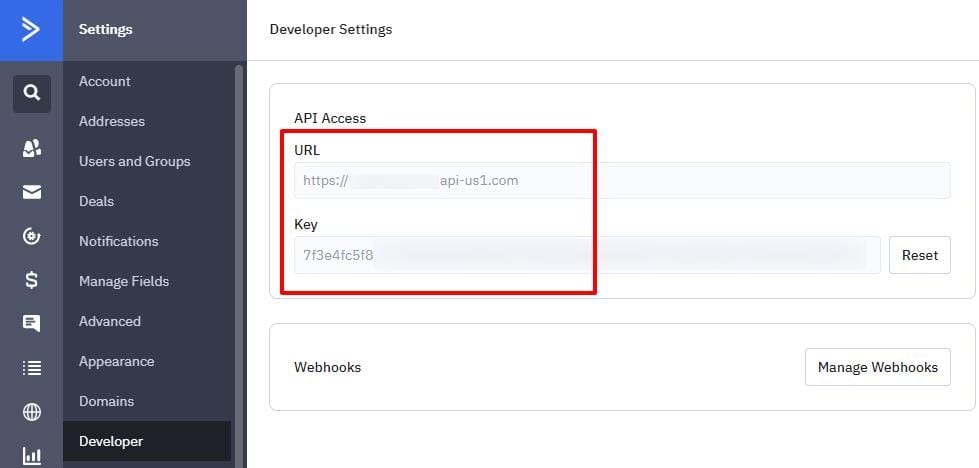
API-URL: Diese finden Sie in Ihrem ActiveCampaign.com > Konto > Einstellungen > Seite Entwickler.
API KEY: Dies kann auch in Ihrem ActiveCampaign.com > Konto > Einstellungen > Seite für Entwickler gefunden werden.
Liste: Wenn Sie Ihre API-URL bzw. Ihren API-Schlüssel korrekt eingegeben haben, sollten hier Ihre verfügbaren ActiveCampaign-Listen angezeigt werden. Wählen Sie die Liste aus, zu der Ihre Partner hinzugefügt werden sollen.
Tag: Wenn Sie Ihre API-URL bzw. Ihren API-Schlüssel korrekt eingegeben haben, sollten hier Ihre verfügbaren ActiveCampaign-Tags angezeigt werden. Wählen Sie das Tag aus, das Sie Ihren Partnerkonten in ActiveCampaign zuweisen möchten.
Anmelde-Checkbox Label: Dies ist der Text, der neben dem Opt-in-Kontrollkästchen in Ihrem Partnerregistrierungsformular erscheinen wird.
