
Dieses Add-on ist erhältlich mit dem Kauf der Plus oder Pro Lizenz.
Provisionsstufen sind nützlich für das Multi-Level-Marketing, das manchmal auch als Netzwerk- oder Pyramiden-Marketing bezeichnet wird.
Die Idee ist, dass der vermittelnde Partner eine Provision in Höhe von X% erhält, aber Sie können auch Y% an den Vorgängern von X und Z% an den Vorgängern von Y zahlen und so weiter. Wir raten jedoch davon ab, zu viele Ebenen einzurichten. Sobald Sie 5–10 Ebenen überschreiten, könnte es zu Leistungsproblemen kommen.
Schauen wir uns also einmal ein Szenario an. Betrachten wir die folgenden Ebenen:
- 25%
- 15%
- 10%
Nehmen wir an, Sally vermittelt einen Verkauf an die Website. Sally erhält eine Provision der Stufe 1 (25%). Sallys übergeordneter Partner, also ihr „Upline“, ist Jeff. Daher würde Jeff die Provision der Stufe 2 (15%) erhalten. Nehmen wir weiter an, dass Sallys „Großeltern-Partner“ (Jeffs übergeordneter Partner) Krystal ist. Krystal würde dann die Provision der Stufe 3 (10%) erhalten.
- Sally erhält 25% von jedem Verkauf, den sie vermittelt.
- Jeff (Sallys Partner) hat Sally geworben und erhält 15% von allen Umsätzen, die Sally erzielt. Außerdem erhält er 25% von allen Umsätzen, die er direkt geworben hat.
- Krystal (Sallys Großeltern-Partnerin und Jeffs Eltern-Partnerin) hat Jeff geworben und erhält 10% aller Umsätze von Sally. Außerdem erhält sie 15% von allen Umsätzen, die direkt von Jeff geworben wurden. Und sie erhält zudem 25% von allen Umsätzen, die sie selbst direkt geworben hat.
Um Stufen in Ihrem Partnerprogramm zu nutzen, müssen Sie zunächst zu „Easy Affiliate > Add-ons“ navigieren und dort das Add-on „Commission Levels“ installieren und aktivieren.
Wenn sie aktiviert ist, fügt sie neue Einstellungen für Provisionsstufen an folgenden Stellen hinzu:
Einstellungen > Provisionen: Hier können Sie Ihre globalen Ebenen festlegen (gilt für alle Partner, sofern sie nicht durch eine der folgenden Einstellungen außer Kraft gesetzt werden).
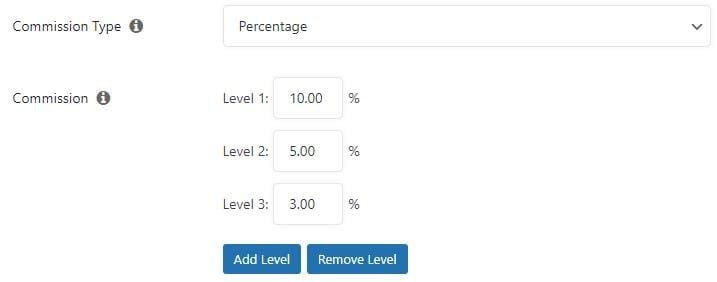
Benutzerprofil > Provisionen außer Kraft setzen: Wenn Sie das WordPress-Benutzerprofil eines Partners direkt bearbeiten, können Sie die globalen Stufen (siehe oben) überschreiben. Dies kann nützlich sein, wenn Sie einem bestimmten Partner bei jedem Verkauf einen höheren oder niedrigeren Prozentsatz (%) zahlen möchten als allen anderen Partnern.
Zusatz zu den Kommissionsvorschriften: Wenn Sie unsere Add-on Kommissionsregelnkönnen Sie auch die oben genannten globalen Ebenen mit jeder Regel außer Kraft setzen. Dies könnte nützlich sein, wenn Sie unterschiedliche Provisionen zahlen möchten, je nachdem, welches Produkt beispielsweise gekauft wurde.
