
Este complemento está disponible con la compra del Pro licencia.
El complemento Informes fiscales puede ayudarle con los requisitos de información fiscal de EE.UU. para los pagos realizados a las filiales.
Podrás enviar un correo electrónico de recordatorio a los afiliados que hayan ganado más de $600 durante el ejercicio fiscal, pero que no tengan una dirección o un número de identificación fiscal configurados en su perfil, para animarles a actualizar su información. También puedes descargar un archivo CSV con una lista de todos los afiliados que hayan ganado $600 o más y que residan en Estados Unidos, con su dirección, la cantidad que han ganado y su número de identificación fiscal, para que dispongas de toda la información necesaria para cumplimentar los formularios 1099.
En primer lugar, tendrás que instalar este complemento desde la página Easy Affiliate > Complementos.
Una vez instalado, diríjase a la página Easy Affiliate > Informes y, a continuación, vaya a la pestaña Impuestos.
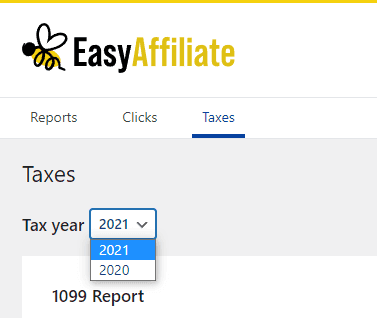
En la parte superior, puedes seleccionar el ejercicio fiscal que deseas consultar. Te recomendamos que selecciones el año anterior a la fecha límite de presentación. Por ejemplo, si la fecha límite de presentación es el 31 de enero de 2022, selecciona el ejercicio fiscal 2021. Por defecto, se seleccionará automáticamente el año anterior.
A continuación, comprueba si tienes algún afiliado con información fiscal incompleta; es posible que falte su dirección o su número de identificación fiscal en la configuración de su cuenta. Puedes ver si algún afiliado cumple estos criterios fijándote en el botón de la sección “Recordatorios de información fiscal”. Si el botón indica “Enviar (0 afiliados)” y está desactivado, significa que la información fiscal está completa para todos los afiliados que cumplen los requisitos. Si el botón indica, por ejemplo, “Enviar (3 afiliados)” y está en azul, significa que 3 afiliados tienen la información fiscal incompleta.
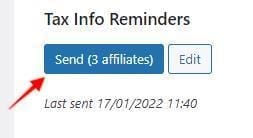
Haga clic en el botón "Enviar (3 afiliados)" para enviar a estos 3 afiliados un correo electrónico recordatorio. El correo electrónico contendrá un enlace a la página Cuenta del panel de control del afiliado, donde podrán actualizar su información. Puede ver o editar el contenido del correo electrónico haciendo clic en el botón "Editar". También se puede enviar un correo electrónico recordatorio a un afiliado específico pasando el ratón por encima de él en la tabla y haciendo clic en "Enviar recordatorio".
Es posible que tenga que esperar algún tiempo hasta que los afiliados actualicen esta información en la configuración de sus cuentas. Por este motivo, recomendamos que los correos electrónicos recordatorios se envíen con bastante antelación a la fecha límite.
Tenga en cuenta que en la tabla sólo aparecerán los afiliados sin dirección o con dirección en Estados Unidos. Si un afiliado actualiza su información y establece una dirección con un país distinto de Estados Unidos, dejará de aparecer.
El último paso es descargar el CSV que contiene la información necesaria para cumplimentar un formulario 1099 para cada afiliado.
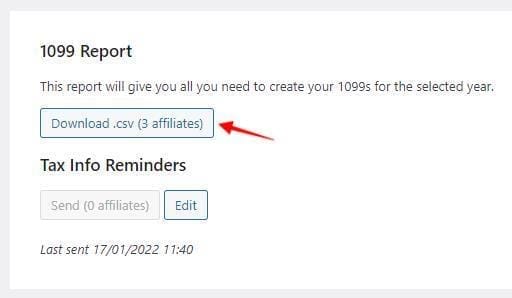
Haz clic en el botón “Descargar .csv” para iniciar la descarga. ¡Así tendrás todo lo que necesitas para tus formularios 1099!
