


Índice
Depois de concluir a configuração de um programa com o Easy Affiliate, você pode ficar ansioso para iniciá-lo imediatamente. No entanto, ainda podem existir problemas imprevistos que tenham passado despercebidos. Ter que lidar com esses problemas quando o programa já estiver em execução pode ser desastroso para seus resultados financeiros.
Por esse motivo, é muito importante garantir que seu programa funcione exatamente como você espera antes de você o lança. Isso significa testar minuciosamente cada elemento e etapa. Você precisa se certificar de que nada seja deixado ao acaso, para ter um lançamento sem atritos.
Neste artigo, mostraremos a você como testar seu programa Easy Affiliate. Vamos começar a trabalhar!
Por que é importante testar seu programa Easy Affiliate?
Se você já usou Afiliado fácil Para criar seu próprio programa de afiliados, você certamente estará ansioso para colocá-lo em funcionamento. No entanto, embora tenhamos certeza de que você dedicou muito tempo para garantir que todos os aspectos do programa fossem configurados corretamente, é difícil prever tudo o que pode dar errado.
É por isso que os testes são muito importantesespecialmente quando se trata de para programas de afiliados. Se você não avaliar minuciosamente o seu programa, poderá acabar deixando passar falhas que podem causar problemas significativos assim que os afiliados começarem a utilizá-lo. Por exemplo, você pode descobrir que taxas de comissão incorretas estão sendo aplicadas ou que os cliques não estão sendo registrados corretamente.
Ter que resolver esses problemas mais tarde pode atrapalhar seu programa, frustrar seus afiliados e acarretar prejuízos tanto financeiros quanto profissionais. Felizmente, os testes não precisam ser complicados. O Easy Affiliate torna o processo relativamente simples, para que você possa identificar e resolver quaisquer problemas inesperados com bastante antecedência em relação à data de lançamento.
Como testar seu programa Easy Affiliate (em 4 etapas)
Agora, vamos ver uma maneira simples, mas eficaz, de testar seu programa de afiliados. Para que isso funcione, é claro que você precisará primeiro ter um programa configurado usando o Easy Affiliate.
Como parte desse teste, você realizará uma compra de teste para garantir que ela seja registrada corretamente. Usaremos um site desenvolvido com o WooCommerce em nosso exemplo, mas lembre-se de que o Easy Affiliate também é compatível com várias outras plataformas de comércio eletrônico.
1. Configurar um link de afiliado
Primeiro, você precisará criar pelo menos um link de afiliado (ou banner). Para fazer isso, acesse Easy Affiliate > Creatives em seu painel de administração:
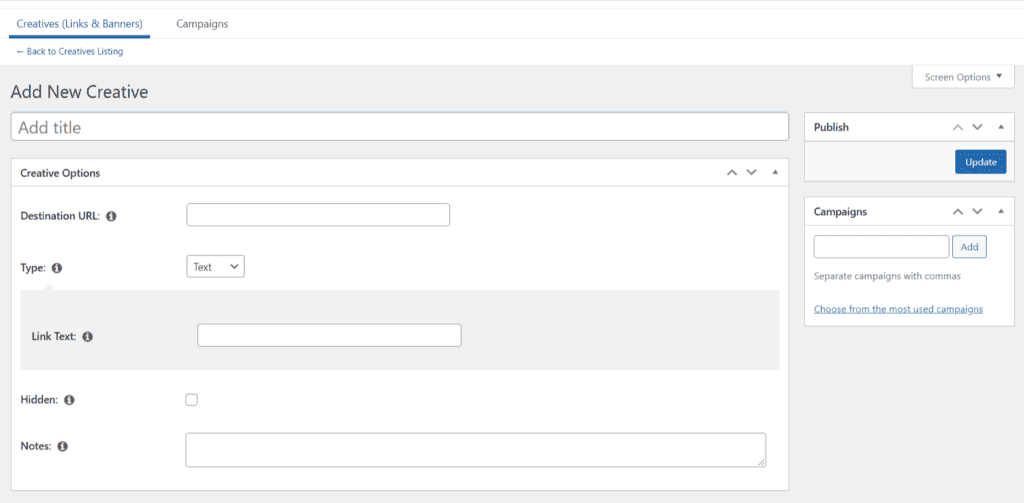
Adicione um título de teste e uma URL de destino, juntamente com algum texto, e clique em “Atualizar”. Agora você está pronto para usar esse link para testar seu programa!
2. Criar uma conta de afiliado fictícia
Para verificar se o seu programa funciona corretamente, você precisará criar um novo usuário. Essa será uma conta fictícia que representa um afiliado; portanto, você deverá definir a função do usuário como Assinante:
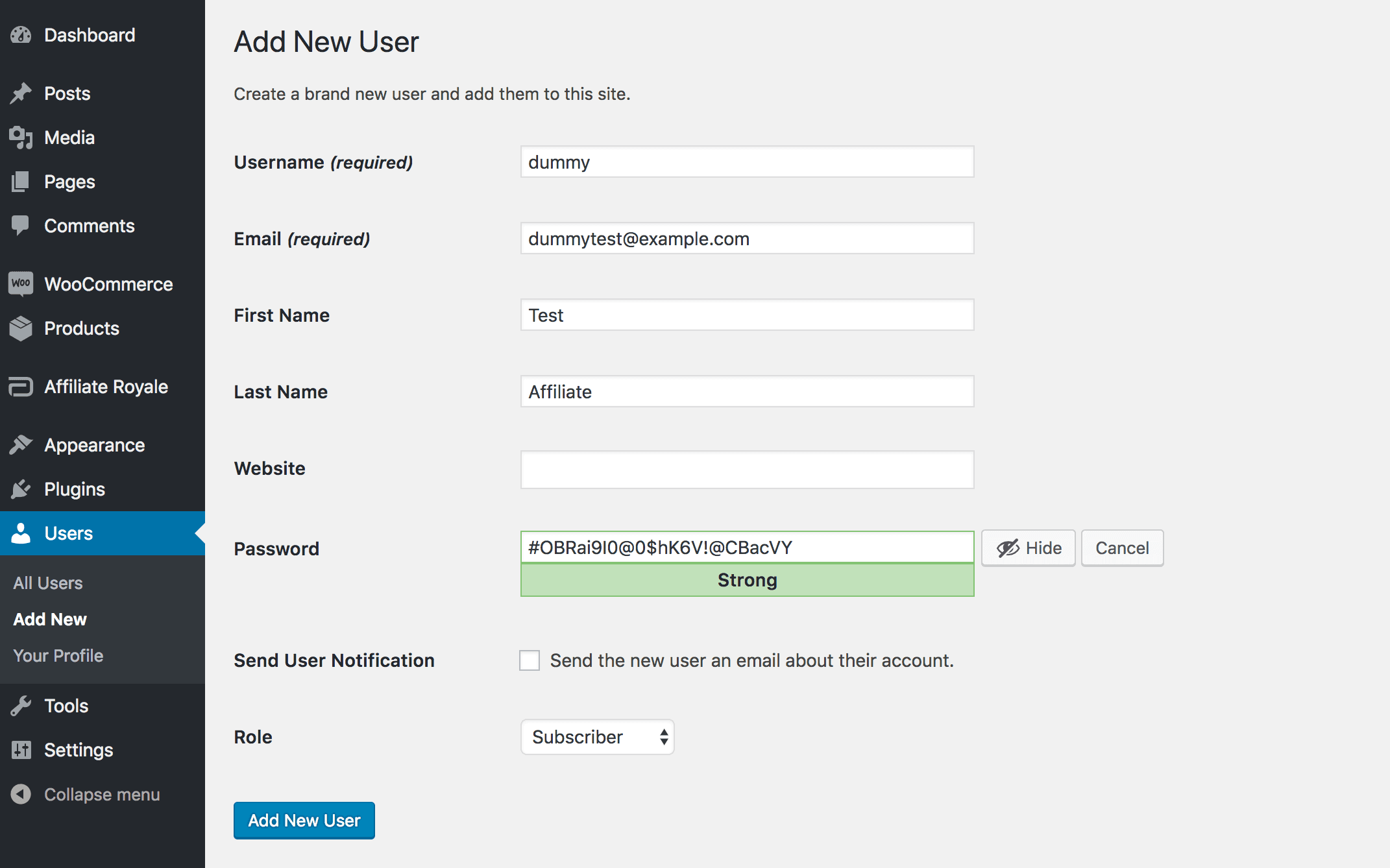
Como essa conta é apenas para seu uso pessoal, você pode criá-la com dados falsos. Obviamente, também não é necessário enviar uma notificação por e-mail. Lembre-se apenas de salvar a senha.
Depois de adicionar esse usuário, saia da sua própria conta de administrador e faça login usando a conta de teste. Em seguida, acesse o painel de afiliados, na seção “Links e Banners”, onde você verá o link que acabou de criar:
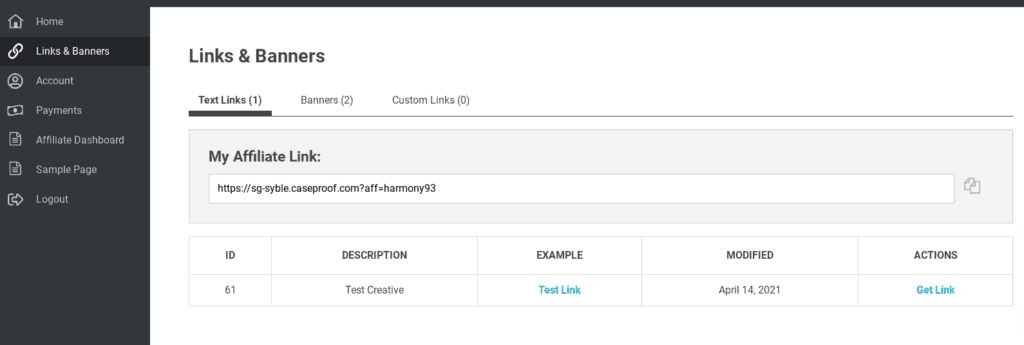
Copie este link e, em seguida, saia da sua conta provisória. É muito importante que você faça isso, pois não pode estar conectado à conta de afiliado ao usar o link.
3. Fazer uma compra
Depois de sair de todas as suas contas do WordPress, abra uma nova janela do navegador. Use-a para acessar seu site, colando o link de afiliado da conta fictícia na barra de endereços do navegador.
Em seguida, conclua a compra normalmente. Obviamente, você não precisará honrar essa compra, portanto, pode usar qualquer forma de pagamento que desejar. Lembre-se de que, se você selecionar Dinheiro na entrega ou, no caso de uma opção semelhante, você precisará concluir o pedido manualmente para que ele seja registrado corretamente:
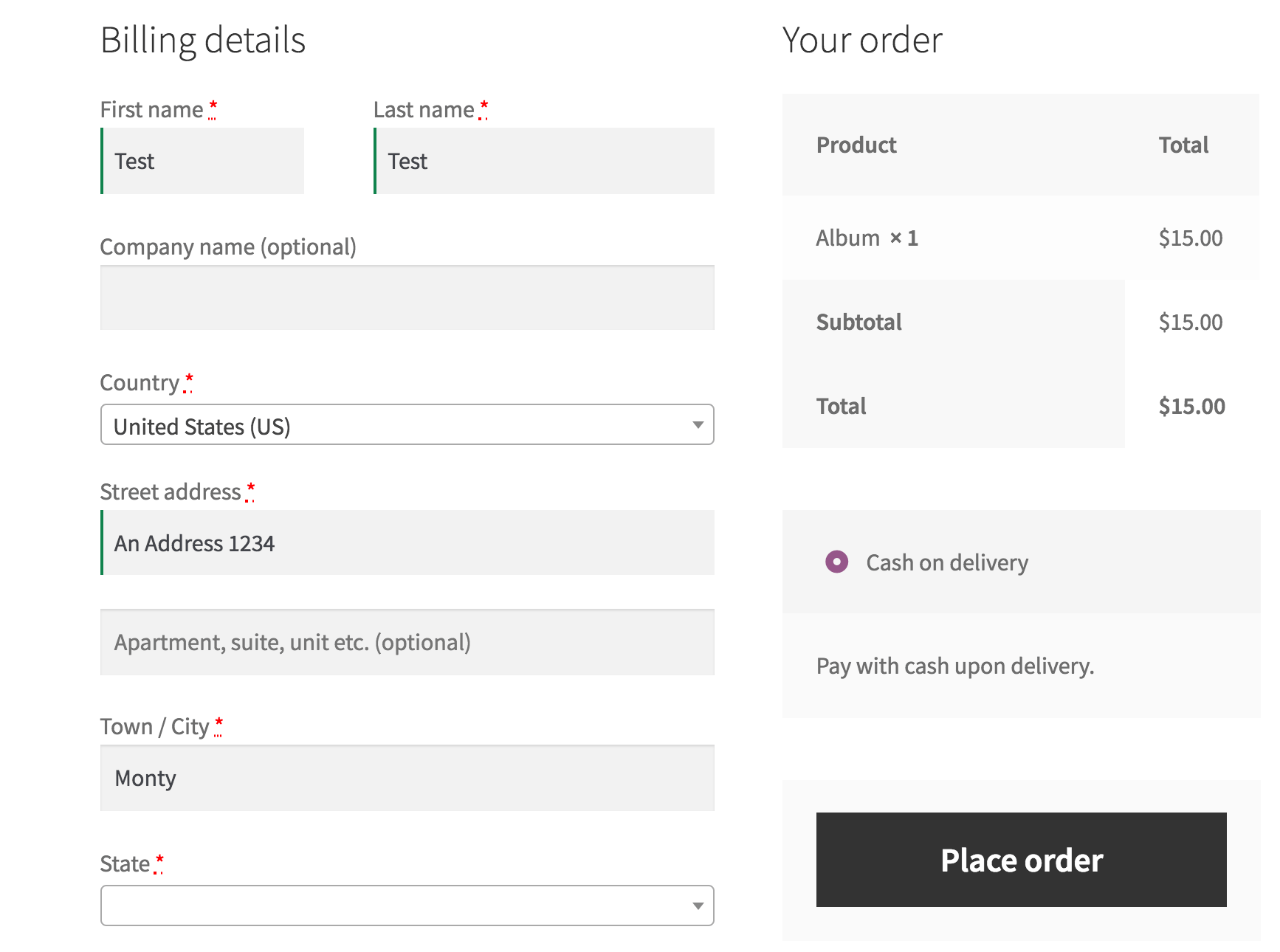
Se tudo está funcionando até agora, você está no caminho certo. No entanto, agora é hora de verificar se o link de afiliado registrou a compra corretamente.
4. Verifique se a compra foi registrada corretamente
Agora, vamos verificar se o link de afiliado funcionou como esperado, tanto para o afiliado fictício quanto para o usuário administrador (ou seja, você). Vamos começar pelo afiliado; portanto, faça login usando os dados da sua conta fictícia mais uma vez. Em seguida, abra seu Estatísticas, onde você poderá ver o número de cliques e vendas que seus links geraram.
Se tudo tiver corrido conforme o planejado, você verá sua compra aparecer ao lado da data de hoje.
Se não aparecer, é possível que a compra não tenha sido concluída corretamente. Você pode verificar isso fazendo login com sua conta de administrador e analisando o pedido. No entanto, se ele aparecer, você saberá que o link funcionou perfeitamente.
Em seguida, você precisa verificar se o link também está funcionando para os administradores do programa. Faça logout de sua conta de afiliado e faça login usando suas próprias credenciais. Em seguida, vá para Easy Affiliate > Transactions (Afiliado fácil > Transações) e verifique se a transação foi registrada:
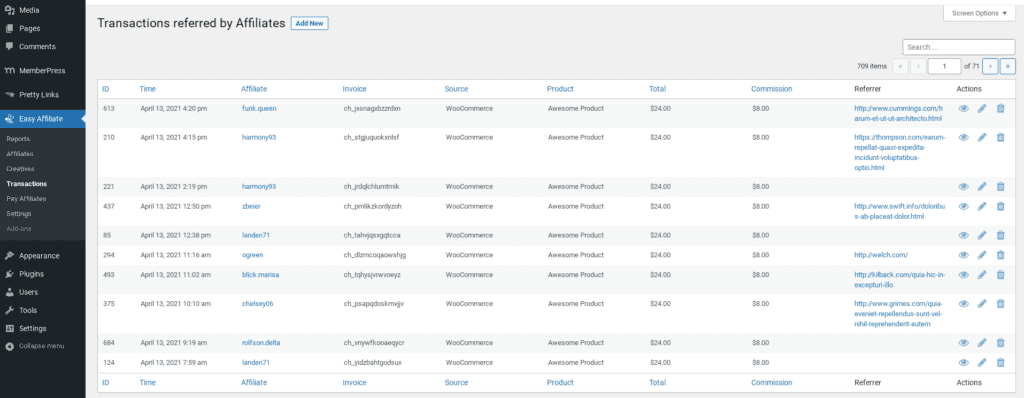
Novamente, se a compra não for exibida, talvez você precise garantir que o link foi configurado corretamente com o URL de destino correto. Você também deve se certificar de que estava desconectado de suas contas quando usou o link.
Se o relatório faz mostrar a transação (o que deve acontecer), então parabéns! Seu programa de afiliados e seus links estão funcionando conforme o esperado, e você deve estar pronto para iniciar.
Conclusão
Depois de criar seu Afiliado fácil programa, ainda falta um passo a ser dado. Para evitar frustrar seus afiliados e passar por surpresas desagradáveis no futuro, é recomendável dedicar algum tempo para testar seu programa antes do lançamento. Dessa forma, você terá a certeza de que ele está funcionando conforme o esperado.
Neste guia, abordamos as etapas necessárias para testar um programa criado com o Easy Affiliate. Você precisará de:
- Configure um link de afiliado.
- Crie uma conta de afiliado fictícia.
- Fazer uma compra.
- Verifique se a compra foi registrada corretamente.
Você tem alguma dúvida sobre como testar seu programa de afiliados? Diga-nos na seção de comentários abaixo!
Se você gostou deste post, não deixe de nos seguir em Twitter, Facebooke LinkedIn! E não se esqueça de se inscrever na caixa abaixo.


Deixe um comentário