Si vous avez défini le type d'inscription Easy Affiliate sur “ Privé ”, vos affiliés ne pourront pas s'inscrire eux-mêmes. Vous devrez alors les ajouter manuellement.
Comme Easy Affiliate utilise la plateforme WordPress, il est extrêmement simple d'ajouter manuellement un affilié à votre programme d'affiliation. Il vous suffit de vous rendre dans votre tableau de bord WordPress > Utilisateurs > Ajouter un nouvel utilisateur, puis de saisir le nom d'utilisateur ou l'adresse e-mail ainsi que les autres informations de profil du nouvel affilié.
Cliquez sur "Soumettre" pour créer le nouvel utilisateur dans WordPress.
Une fois l'utilisateur créé, retournez à la page Utilisateurs et recherchez le nouvel utilisateur. Survolez son nom d'utilisateur et cliquez sur "Modifier".
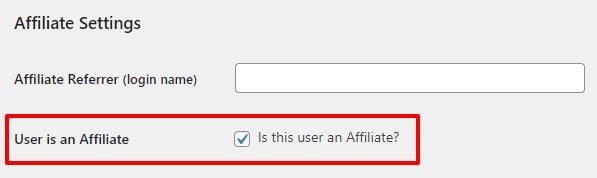
Faites défiler vers le bas jusqu'à la rubrique Paramètres d'affiliation section et cochez la case “ Cet utilisateur est-il un affilié ? ”, puis enregistrez le profil de l'utilisateur.
L'utilisateur sera désormais affilié. Vous souhaiterez sans doute lui envoyer un e-mail immédiatement après pour lui indiquer où et comment se connecter à votre tableau de bord d'affiliation.